Read Part 1 here.
Similar to Facebook, Twitter is a social media website. Tweets are like Facebook status’, but
are limited to 140 characters. You can share photos with your tweets, and you
can also tweet links to other websites.
 |
| An example of a tweeted picture. |
 |
| An example of a tweeted link. |
On Twitter, people can follow your business’ account and then they will see your tweets in their twitter feed. You can use Twitter on your computer or as an app on your phone or tablet. There is no distinction between individual accounts and businesses or organizational accounts. Twitter is also useful for you to keep up with what’s going on with artists you like, businesses with which you are affiliated, organizations of which you are a member, news outlets that you read, the city in which you live, and
even celebrities in whom you are interested. If you follow people, they are likely to follow you back.
On top of creating your own tweets, with photos or links, if you so choose, you can also retweet others' tweets. This means you are sharing their tweet with your followers. This is useful when you are hoping to share information about an event or about another artists' work.
Instagram
is
a photo sharing app that you can only use on a personal mobile
device, such as
a smart phone or tablet. You need to download the app to be able to use
it. For
some reason, you cannot post via the website, but you can sign into your
account and view other’s posts on the website. Since you create art,
Instagram
is an awesome way to share your work! Always caption your photos, and
feel free
to share with your Facebook page. Avoid overusing filters, however, since you want to show the public what your art looks like in real life. Overusing filters can also appear unprofessional.
When sharing to Twitter,
your tweet will simply share a link to your Instagram profile, which is
not ideal. I would recommend tweeting the same photo as a Twitter
photo, instead of sharing via the Instagram app. This way, the photo
will open
in a viewer’s Twitter feed.
Hashtags are great for Instagram, Facebook and Twitter! A hashtag is a label you can add to any message that will let people view it who don't follow you or like your page. Hashtags don’t work from private or personal Facebook pages, but they do work when you use them from a public page. Both your Instagram and Twitter accounts are public (and they should be!) and using a hashtag lets people searching for related subjects stumble upon your work.
 |
| An Instagram photo shared to Twitter. |
Hashtags are great for Instagram, Facebook and Twitter! A hashtag is a label you can add to any message that will let people view it who don't follow you or like your page. Hashtags don’t work from private or personal Facebook pages, but they do work when you use them from a public page. Both your Instagram and Twitter accounts are public (and they should be!) and using a hashtag lets people searching for related subjects stumble upon your work.
For example, if I am visiting Edmonton and I would like to see what’s going on
in the city, I may search the hashtag #yeg (This is the airport code for
Edmonton and it has become common practice to use these codes as a hashtag). I
can see the most popular or the most recent posts by anyone who used that hashtag. If
someone had just tweeted about being at an art market in Edmonton using this
hashtag, I may view this and decide to go to said market! The same goes for both Facebook and Instagram. Hashtags may seem trendy or annoying, but they are helpful when it comes to reaching out to the public. Again, try not to overdo it, however. There is a fine line between professional and annoying.
The bottom line about social media is this: try it out. See if it's for you. Don't write it off as something that simply won't work for you or your business. Perhaps start by looking at other businesses' profiles and judge for yourself.
For more information about Twitter and Instagram, check out these links:
Twitter for Business
Why Artists Should Use Twitter
Instagram for Business
Instagram for Artists
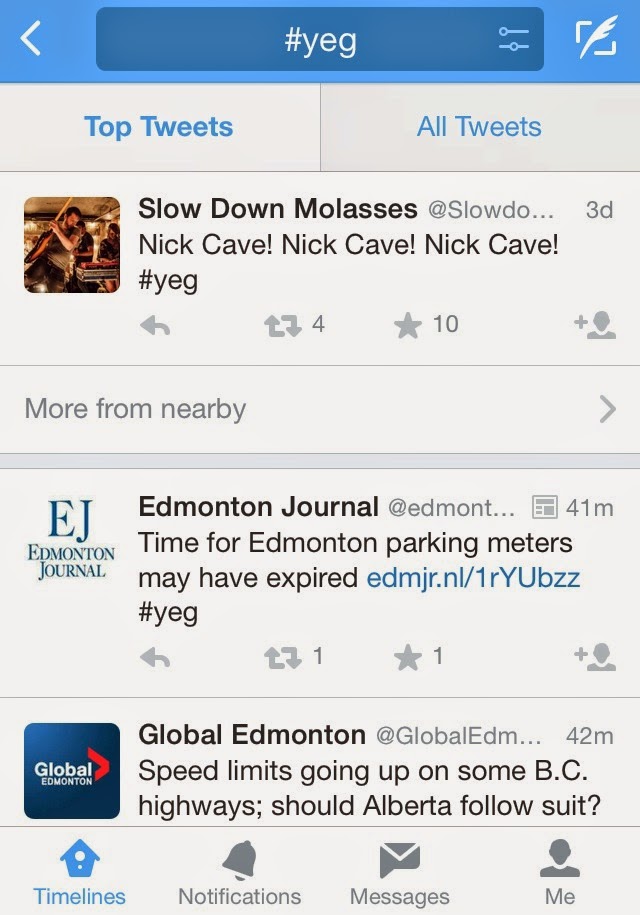 |
| The most popular tweets on a hashtag on Twitter. |
 |
| The most recent tweets using a hashtag on Twitter. |
The bottom line about social media is this: try it out. See if it's for you. Don't write it off as something that simply won't work for you or your business. Perhaps start by looking at other businesses' profiles and judge for yourself.
For more information about Twitter and Instagram, check out these links:
Twitter for Business
Why Artists Should Use Twitter
Instagram for Business
Instagram for Artists

